
Adware, Spyware, Malware ….. This is dealt with by anti spyware products (not the same as anti-virus) and for everyday use I recommend ‘SuperAntiSpyware’ which is available in both ‘free’ and ‘paid for’ versions. The free version is perfectly adequate for most users. Click on the image to go to the SuperAntiSpyware web site.

The free version does not update itself automatically. You must update it (‘Check for Updates’) each time you run the program to ensure that you are using the most recent reference library of bugs.
A new version – Version 6 – was released at the end of July 2014 and in April 2018 still looks about the same despite several minor updates. The ‘New User Interface’ is described as being ‘simplified and touch screen capable’. … Progress.
Close all open programs before scanning.
1. Start SuperAntiSpyware and select ‘Click here to check for updates’. Always do this first. The database of bugs is updated daily – there may also be a program update.
2. Click on ‘Scan This Computer’.
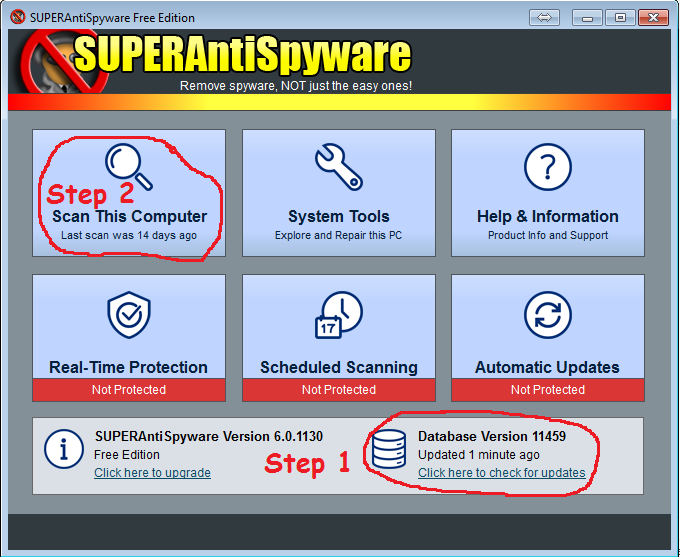
Choose a ‘Complete Scan’ unless you have the knowledge to make a different selection.

Scanning can take quite a long time. In theory you can carry on working while it is scanning but everything will slow down, very frustrating. It is better to start a scan and leave it running while you do something that does not need the computer – have lunch, watch tv, file paperwork, sleep…..

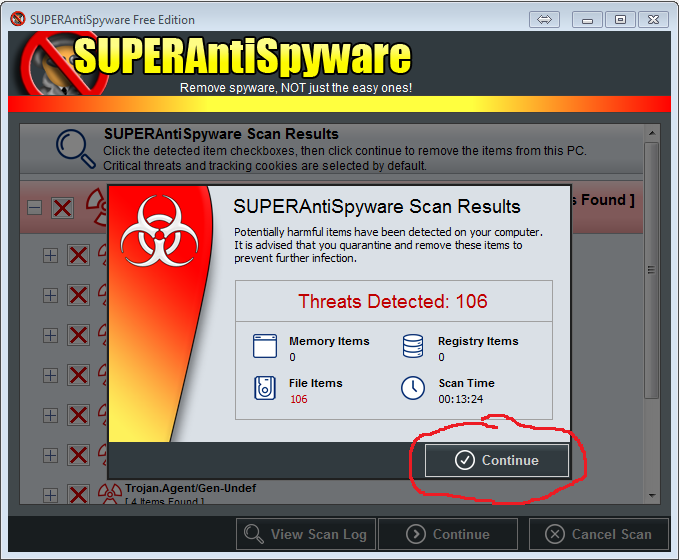
When the scan is completed, it will almost always find something, just make sure that anything it finds has an X in the box and let the program ‘fix’ or ‘delete’ whatever it has found.


Finally… Shutdown and Re-start the computer.
Most of the findings will be harmless ‘Cookies’ but sometimes you will have been infected by something rather more worrying. As always – if in doubt – ask.
Sometimes your computer will be infected by ‘something’ that SuperAntiSpyware does not detect or which you cannot easily remove. You must take threats seriously and not just put up with them. Seek professional advice before matters get worse and you risk losing your precious data.