Important Update:
 CCleaner is a piece of software that I advise clients to use as part of their routine computer maintenance. It removes temporary and other unwanted files.
In the past, it has not been necessary to update CCleaner very frequently. It is a fairly benign and safe product.
I now suggest that you try to keep your copy of CCleaner reasonably up-to-date.
Recent unpublicised changes made by Google to their Chrome web browser meant that some older versions of CCleaner could partially corrupt the Chrome preferences file. This ‘bug’ or ‘temporary incompatibility’ has been fixed in the latest versions of CCleaner. One of the many joys of owning a computer!
I have made the latest version of CCleaner (April 2018 – v5.41 – size approx 14MB) available by CLICKING HERE TO DOWNLOAD so that you can avoid some of the hoops of obtaining it elsewhere. After you have downloaded the new file to your computer, just run it and it will update your existing version. If at the end of the installation it starts the program and displays “release notes” just close that window. Avoid it by unticking the “display release notes” option at the last stage of installation.
If you are not sure what to do…. ask. I can connect remotely and do it for you, it only takes a few minutes.
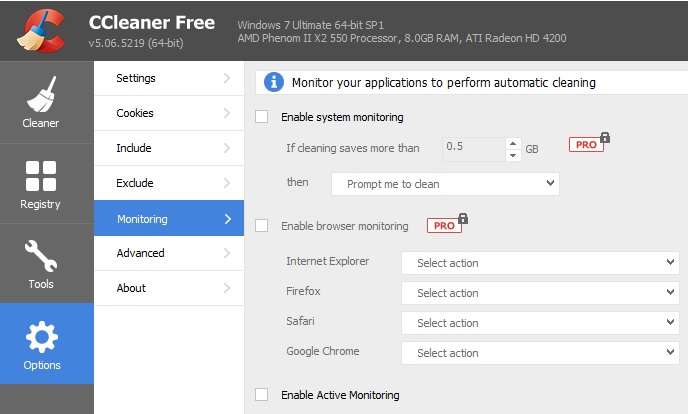
Unfortunately, software developers keep “tweaking” their software to “improve it” by adding extra functions. Very confusing for the user. I expect this is driven by the marketing department. CCleaner now adds “Active Monitoring” which is switched on by default and quite pointless, so go to “Options” and switch it off (untick the boxes).